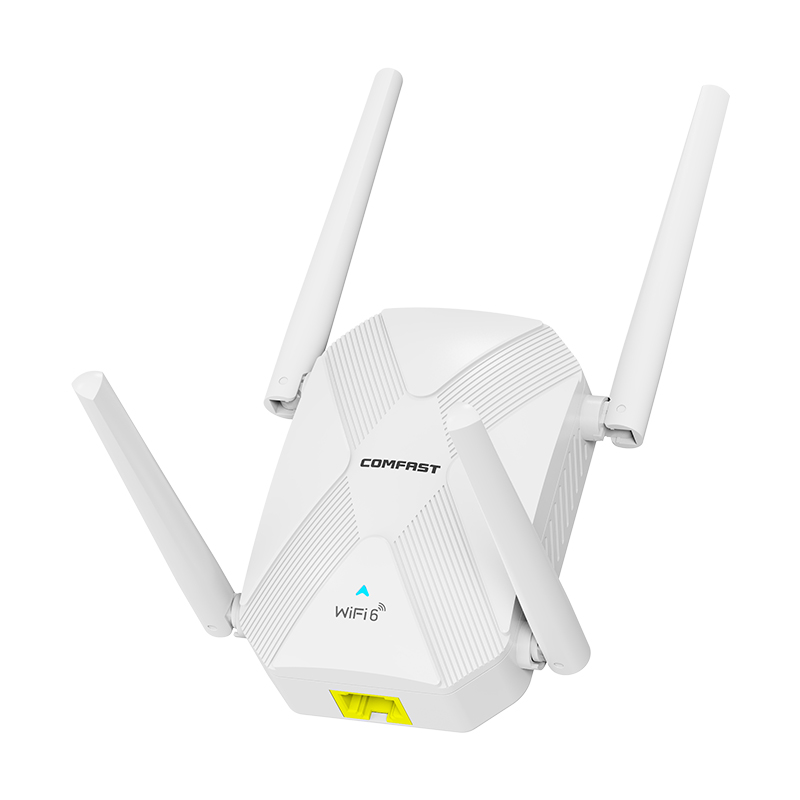
Wi-Fi 6 Extender & Booster – Dual-Band 2700Mbps

AUD AU$132.95
AUD AU$162.83
Quantity
  • Chat with Us

  • Secure payments

  • 14-day returns

Why Choose Us

No Router Replacement Needed
Dual-Band Wi-Fi 6 Up to 2700Mbps
Supports 160 MHz Wide Channel Bandwidth
4 External Antennas for Stronger Signal
Triple-Core Processing for Smooth Performance
Gigabit Ethernet for Fast Wired Connections
Efficient Wi-Fi for Multiple Devices
Flexible Modes for Different Network Setups
No Router Replacement Needed
Dual-Band Wi-Fi 6 Up to 2700Mbps
Supports 160 MHz Wide Channel Bandwidth
4 External Antennas for Stronger Signal
Triple-Core Processing for Smooth Performance
Gigabit Ethernet for Fast Wired Connections
Efficient Wi-Fi for Multiple Devices
Flexible Modes for Different Network Setups

Dual-Band Wi-Fi 6 Range Extender

Extend your existing Wi-Fi coverage to more areas of your home. Help reduce weak-signal spots in bedrooms, home offices and other rooms. Coverage and performance vary depending on your router, home layout and obstacles.

Dual-Band Speeds up to 2700 Mbps

Enjoy a theoretical combined speed of up to 2700 Mbps, with up to 300 Mbps on 2.4 GHz and 2400 Mbps on 5 GHz. Choose the band that suits your devices and everyday activities, from browsing and video calls to streaming.

Four External Antennas

Four adjustable, high-gain antennas help distribute the wireless signal around your home. Position them to suit your space and improve reception in areas where your router’s signal is weaker.

Extend Your Wi-Fi to More Rooms

Wi-Fi 6 Range Extension
GIGABIT PORT
WALL-PENETRATING ANTENNAS
Easy Setup
Wi-Fi 6 Range Extension
GIGABIT PORT
WALL-PENETRATING ANTENNAS
Easy Setup

160 MHz Wide Channel Support

Support for 160 MHz channels helps make more bandwidth available when paired with compatible devices and network settings. Actual performance depends on your router, connected devices and local wireless conditions.

Gigabit Ethernet Port

The Gigabit WAN/LAN port supports wired connections up to 1000 Mbps. Connect the extender to a wired network in access point mode, or use the port with a compatible wired device.

Flexible Wi-Fi Extension with Gigabit Ethernet

Wired or Wireless Setup
Choose a wired or wireless connection to extend your existing network. Connect compatible phones, laptops, TVs and other Wi-Fi devices in more areas of your home.
Gigabit Ethernet for Faster Wired Connections
The Gigabit WAN/LAN port supports wired link speeds of up to 1,000 Mbps. Compared with a 100 Mbps Fast Ethernet port, it offers a higher potential connection speed for compatible equipment.
Wired or Wireless Setup
Choose a wired or wireless connection to extend your existing network. Connect compatible phones, laptops, TVs and other Wi-Fi devices in more areas of your home.
Gigabit Ethernet for Faster Wired Connections
The Gigabit WAN/LAN port supports wired link speeds of up to 1,000 Mbps. Compared with a 100 Mbps Fast Ethernet port, it offers a higher potential connection speed for compatible equipment.

Connect Multiple Devices

MU-MIMO and OFDMA technologies help the extender manage data for multiple connected devices. This can support smoother everyday use across phones, laptops, TVs and other compatible devices.

Easy Setup – No New Router Needed

Connect the Wi-Fi extender to a compatible existing router to expand coverage into more areas of your home. Once configured, your network settings are saved automatically, so you generally won't need to set it up again after switching the power off and on.

Three Flexible Ways to Extend Your Home Network

1. Extend Wi-Fi to More Rooms
Use repeater mode to connect wirelessly to your existing router and help improve coverage in bedrooms, home offices and other areas with a weaker signal.
2. Turn a Wired Connection into Wi-Fi
Connect the extender to your network with an Ethernet cable to create a Wi-Fi access point for phones, laptops, TVs and other compatible devices.
3. Connect Wired Devices to Your Wi-Fi Network
Use the extender’s Ethernet port to connect compatible PCs, smart TVs and other wired devices to your existing Wi-Fi network—without running a cable all the way back to your main router.
1. Extend Wi-Fi to More Rooms
Use repeater mode to connect wirelessly to your existing router and help improve coverage in bedrooms, home offices and other areas with a weaker signal.
2. Turn a Wired Connection into Wi-Fi
Connect the extender to your network with an Ethernet cable to create a Wi-Fi access point for phones, laptops, TVs and other compatible devices.
3. Connect Wired Devices to Your Wi-Fi Network
Use the extender’s Ethernet port to connect compatible PCs, smart TVs and other wired devices to your existing Wi-Fi network—without running a cable all the way back to your main router.

Ventilated Design for Stable Operation

Precisely positioned ventilation openings help promote airflow and dissipate heat during use, supporting stable performance for everyday use.

WPA3 Network Security

WPA3 encryption helps protect your wireless network. The built-in ventilation openings are designed to support airflow during operation.

Please note: The stated wireless speeds are theoretical maximums. Actual speeds and coverage vary with your internet service, router, device compatibility, distance, walls and other sources of interference. A range extender can improve Wi-Fi coverage, but it does not increase the speed provided by your broadband plan.

Product Specifications

  • Wi-Fi standard: IEEE 802.11a/b/g/n/ac/ax, including Wi-Fi 6

  • Frequency bands: 2.4 GHz (2.412–2.472 GHz); 5 GHz (5.180–5.825 GHz)

  • Theoretical wireless speeds: Up to 300 Mbps on 2.4 GHz and 2,400 Mbps on 5 GHz; up to 2,700 Mbps combined2

  • Ethernet port: 1 × Gigabit RJ45 WAN/LAN port, 10/100/1000 Mbps

  • Antennas: 4 external antennas, 3 dBi each

  • Chipset: RTL8198D-VG1-CG + RTL8192FRH + RTL8832CR-VD

  • Memory: 128 MB RAM and 16 MB Flash

  • Operating modes: Access Point (AP), Repeater and Router modes

  • Controls and indicators: Reset button and tri-colour LED indicator

  • Power input: AC 220 V

  • Maximum power consumption: 9 W

  • Dimensions: 232 × 86.85 mm, including antennas; manually measured

  • Operating temperature: −10°C to 40°C

  • Storage temperature: −40°C to 70°C

  • Operating humidity: 10%–90% RH, non-condensing

  • Storage humidity: 5%–90% RH, non-condensing

Wireless rates are theoretical maximums. Actual speeds vary depending on the router, connected devices, distance, interference and network conditions.

FAQ
1. What does this Wi-Fi range extender do?

It works with your existing router to help extend Wi-Fi coverage to more areas of your home, including rooms where the signal may be weaker.

2. Is it compatible with my router?

It supports 802.11a/b/g/n/ac/ax standards and is designed to work with most standard Wi-Fi routers, including Wi-Fi 6 models. Compatibility may depend on your router’s settings.

3. What setup modes are available?

Use repeater mode to extend your router’s Wi-Fi wirelessly, or access point mode to create Wi-Fi from a wired Ethernet connection. The Ethernet port can also connect compatible wired devices.

4. What wireless speeds can it support?

The dual-band Wi-Fi 6 extender offers theoretical combined speeds of up to 2,700 Mbps: up to 300 Mbps on 2.4 GHz and 2,400 Mbps on 5 GHz. It also supports 160 MHz channels with compatible devices and network settings. Actual speeds vary by setup and conditions.

5. Will it increase the speed of my broadband plan?

No. It extends Wi-Fi coverage but does not increase the speed provided by your internet service. A stronger signal in a weak-coverage area may help provide a more reliable connection.

6. How much area can it cover?

The product information gives an approximate coverage guide of 70–120 m². Actual coverage depends on your home’s layout, walls, building materials, router placement and wireless interference.

7. Can I connect wired devices?
Yes. The Gigabit WAN/LAN port supports link speeds of up to 1,000 Mbps for compatible devices such as PCs and smart TVs. Actual speeds depend on the connected equipment, Ethernet cable and network.
8. Does it support network security features?
It supports WPA3 encryption to help protect your Wi-Fi network. Available security features may depend on the settings and compatibility of your router and connected devices.
9. Will I need to set it up again after switching it off?
Your settings are saved automatically, so you generally won’t need to configure it again after a power interruption. A factory reset will require setup again.
10. Is one extender enough for a large home?
Coverage depends on the size and layout of your home. For larger homes, multiple floors or rooms separated by thick walls, an additional extender may help provide broader coverage.
11.Will I need to replace my existing router?
No. The Wi-Fi extender is designed to work alongside a compatible existing router, helping extend wireless coverage without replacing your broadband equipment.
12.Does it work with TP-Link, ASUS or Virgin Media routers?

Yes,the extender supports common Wi-Fi standards, including Wi-Fi 4, Wi-Fi 5 and Wi-Fi 6. Compatibility with individual router models and settings may vary. Please contact us if you would like to check a specific router before purchasing.

Cart

loading